
Picture a small dental clinic around lunchtime. The receptionist is at lunch, the dentist is with a patient, and the phone keeps ringing. One caller wants to know if the clinic takes their insurance. Another has a broken tooth and wants to come in today. A third wants to move a cleaning to Saturday. Nobody picks up, so two of them call the clinic down the road.
Most small businesses have an hour like this every day, which is a big part of why "AI receptionist" grew into one of the fastest rising searches of the year. The idea is simple. A voice agent picks up every time, deals with the easy questions on its own, books the visit, and hands anything it is unsure about to a person.
In this guide we build that agent in Python with Intelli, the Python library in IntelliNode. It answers from the clinic's own notes rather than from memory, it checks the calendar before it promises a time, and it recognizes a caller who phoned last month. You can run it on your laptop with nothing more than an OpenAI key. The real phone number comes at the end.

What the receptionist does
Our example clinic is Bright Smile Dental, and the agent that answers for it is called Sam. We gave Sam four jobs, and no more than four:
- Answer questions such as "are you open on Saturday?" or "how much is a cleaning?" from the clinic's notes.
- Book a visit. Sam checks which times are free, offers one, and books it once the caller agrees.
- Take a message when the caller wants a person, or when the notes do not cover the question.
- Recognize returning callers. Someone who booked a cleaning last month can say "the same as last time", and Sam knows what they mean.
Medical advice and payments are not on the list. Those stay with the staff, on purpose.
Nothing about this is specific to dentists. A plumber, a law office or a small hotel would swap out two things, the notes Sam reads and the function it calls to book, and keep the rest as it is.
What happens each time the caller speaks
A call with Sam is a conversation, just like a call with a person at the front desk. The caller says something, Sam answers, the caller says something back. Each time the caller finishes talking, Sam does the same three things:
- Hear. Sam turns the caller's voice into written text, the way the dictation on your phone does.
- Think. Sam reads that text and works out the answer. It looks things up in the clinic's notes, and if the caller wants an appointment, it checks the calendar for a free time.
- Speak. Sam turns its answer into a voice and plays it to the caller. Then it waits for the caller to talk again, and the three steps start over.
Here is one example. The caller asks: "Can I come in Saturday morning for a cleaning?" Sam hears the question as text. It finds in the notes that the clinic is open on Saturday from 9 to 1 for cleanings, then checks which Saturday times are still free. It answers out loud with a time, something like "I have 10 o'clock free on Saturday. Shall I book it for you?"
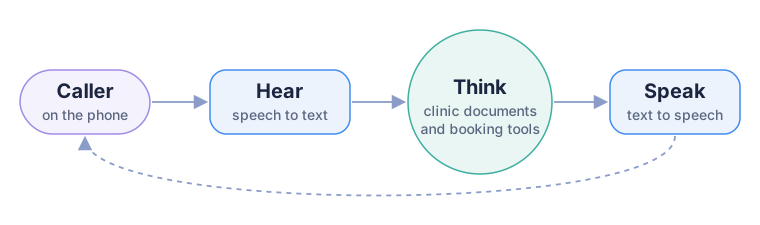
The three steps run every time the caller speaks. After Sam answers, it listens again.
In the code, each step is its own Intelli class, and the three do not have to come from the same company. We used OpenAI for all three to keep the first run simple. The table shows what you can switch to later, for example cheaper speech to text, or a voice with a particular accent.
| Step | Intelli class | Providers you can choose |
|---|---|---|
| Hear | RemoteRecognitionModel | OpenAI, ElevenLabs, Speechmatics, or Whisper on your own machine |
| Think | Assistant | OpenAI, Claude, Gemini, Mistral, Amazon Bedrock, or a local model through Ollama |
| Speak | RemoteSpeechModel | OpenAI, Google, Gemini, ElevenLabs, Amazon Polly |
Four small files: the clinic notes, the receptionist, a script for testing it on your computer, and the phone server.
Then in a terminal, open the folder you unzipped and install what it needs:
pip install -U intelli fastapi uvicorn python-multipart
You need Intelli 2.1.3 or above and Python 3.10 or above.
Step 1: Give it the clinic's knowledge
Here is the rule we built everything else around: a receptionist that makes up a price is worse than one that never picks up. A wrong price turns into an argument at the front desk a week later. So Sam is not allowed to answer from what the model happens to know. The facts about the clinic sit in one plain text file, clinic_info.md, and Sam looks things up in a vector store built from that file.
If vector stores are new to you, the short version is this. The store keeps every piece of text next to an embedding, a long list of numbers that represents what the text is about. Ask it "do you take Cigna?" and it hands back the paragraph about insurance, even though the word insurance never came up. That one paragraph is what the model sees, not the whole file. Two good things follow from that. The answers stay close to what you wrote, and you are not paying to send the entire document on every single turn of every call.
The setup, from receptionist.py:
embedder = {"provider": "openai", "api_key": KEY}
knowledge = MemoryVectorStore(embedder=embedder, path="data/knowledge.json")

# embed the clinic notes once, not on every start
if knowledge.count() == 0:
    assistant.add_files(["clinic_info.md"], chunk_size=500, chunk_overlap=50)
Why 500 for chunk_size? Because of how people ask things on the phone. They want one fact, "Saturdays, nine to one", and not a whole page read out to them. Pieces of roughly 500 characters match that better than the larger default, so the model gets the fact and very little around it. The vectors are written to data/knowledge.json. When the clinic changes a price, you edit the notes, delete that JSON file, and the store is rebuilt the next time the program starts.
For a single clinic the in-memory store is all you need. If you ran ten locations with thousands of pages of notes, you would want a real database behind it, and that is a change to one line:
knowledge = QdrantVectorStore(url="http://localhost:6333", collection="clinic", embedder=embedder)
Pinecone, pgvector, Chroma, Weaviate, Milvus, Elasticsearch, MongoDB Atlas, Firestore and Vertex AI all work the same way. The vector stores page has the setup for each one.
Step 2: Let it book appointments
A receptionist that can only answer questions is a FAQ page with a voice. Sam has to do things as well. In Intelli a tool is an ordinary Python function, and the docstring is what the model reads when it decides whether to call it:
def check_open_slots(day: str) -> list:
    """List the free appointment times on one day. day is a date such as 2026-11-03."""
There are three tools in the example, check_open_slots, book_appointment and take_message. For now they read and write small JSON files in the data folder, which turned out to be handy during testing because you can open the file and watch a booking land. When you go live, you replace the inside of each function with a call to your calendar or your practice software. The model never sees the inside, only the name and the docstring, so from its side nothing changed.
There is one detail here we would not leave out. Sam's instructions tell it to read back the day, the time, the name and the phone number before it books. That helps, but an instruction is not a lock, and models do skip a step now and then. So book_appointment checks the slot a second time, in code. If two callers ask for Tuesday at 10:00 within the same minute, the second one hears that the time has just gone and gets offered 11:00 instead. Nobody is double booked, and no instruction had to be followed for that to be true. Any rule that costs you money when it is broken belongs in code, where the model cannot talk its way around it.
Step 3: Tell it that it is on the phone
Have a chat answer read out loud some time. The bulleted list of prices, the bold headings, the "click here" link, all of it sounds strange through a phone speaker. So the first thing Sam's instructions do is explain where it is:
INSTRUCTIONS = f"""You are Sam, the phone receptionist at Bright Smile Dental. Today is {date.today():%A %d %B %Y}.
You are speaking on the phone, so answer in one to three short sentences, with no lists, no markdown and no links.
..."""
The date is there for a reason. Without it, "next Tuesday" means nothing to the model, and it will book something on a Tuesday, just not necessarily the right one.
With the instructions written, the assistant gets everything in one place: the notes, the three tools, a history for each call, and a second vector store that acts as memory.
assistant = Assistant(
    provider="openai", api_key=KEY, model="gpt-5-mini",
    system_message=INSTRUCTIONS,
    history=FileChatHistory(dir="data/calls"),
    knowledge=knowledge,
    memory=MemoryVectorStore(embedder=embedder, path="data/callers.json"),
    tools=[check_open_slots, book_appointment, take_message],
)
That memory store is what makes returning callers work. Every exchange is saved under the caller's phone number. When the same number rings next month, the assistant searches those older exchanges using whatever the caller just said, which is why "the same as last time" has something to attach to.
Step 4: Add the ears and the voice
Hearing and speaking take one call each:
def hear(audio_path):
    return ears.recognize_speech(SpeechRecognitionInput(audio_file_path=audio_path, language="en"))

def speak(text):
    return voice.generate_speech(Text2SpeechInput(text=text, voice="nova", model="tts-1", stream=False))
The language="en" setting is there so the transcriber does not have to guess the language from two seconds of a noisy recording, which it sometimes gets wrong. The nova voice is one of several OpenAI offers; try a few and keep whichever sounds like someone you would want at your own front desk.
Before a phone gets anywhere near this, try it on your computer with try_it.py:
export OPENAI_API_KEY="your-key"
python try_it.py
You type what a caller might say. Sam's reply prints on the screen and is also saved as reply.mp3, so you can hear how it sounds. We suggest these three, because each one exercises a different part:
Do you take Cigna?
Can I come in Saturday morning for a cleaning?
I want to talk to someone about my bill.
The first is answered from the notes. The second should go through the booking tools. The third should end with a message saved in data/messages.json.
If you want to test the hearing step as well, record a voice memo on your phone and pass the file: python try_it.py question.mp3.
Step 5: Connect a real phone number
For the phone line the example uses Twilio. You rent a number from them, and whenever that number rings, Twilio calls your server and asks what it should do next. Vonage and Telnyx work in much the same way, if you already have an account with one of them.
phone_server.py has two addresses. /voice answers with a greeting. /turn runs every time the caller stops talking: Twilio sends over a recording of what they said, and the server hears, thinks and speaks.
@app.post("/turn")
def caller_spoke(CallSid: str = Form(...), From: str = Form(""), RecordingUrl: str = Form(...)):
    ...
    question = hear(file.name)
    reply = think(question, caller=From or CallSid, call_id=CallSid)
    return twiml(say_with_our_voice(reply) + LISTEN + GOODBYE)
From is the caller's number, and we use it as the user id, which is how the memory knows who is on the line. CallSid keeps each call in its own conversation.
Start the server:
uvicorn phone_server:app --port 8000
Twilio cannot reach a laptop directly, so it needs a public https address. While you are testing, a tunnel such as ngrok will do: run ngrok http 8000 and put the address it prints into PUBLIC_URL. The server also needs TWILIO_ACCOUNT_SID and TWILIO_AUTH_TOKEN to download the recordings. Then, in the Twilio console, open your number and set "A call comes in" to https://your-address/voice with POST.
Call the number. Sam picks up.
About the pause between turns
This design takes turns, a bit like a walkie-talkie. The caller speaks, stops, waits a moment, and then hears Sam. Where does the moment go? Twilio waits through two seconds of silence to be sure the caller has finished, then comes the transcription, then the reply, then the voice. Added up, it is a few seconds. For someone booking a cleaning that is usually fine, and a turn-based agent is a great deal easier to run and to debug than the alternative.
If it feels slow to you:
- Lower the
timeoutinLISTENfrom 2 seconds to 1. Callers who pause in the middle of a sentence will be cut off more often, so test this with real people before you keep it. - Keep the replies short. Sam is already limited to three sentences, and less text means less audio to generate.
- Use a faster model for the thinking step. Changing
modelis one line.
An agent you can interrupt mid-sentence needs streaming audio in both directions, which is a bigger project with more moving parts. Our advice is to start with turns, listen to what people actually call about for a few weeks, and only then decide whether you need the other kind.
Keep recordings on your own server
Some clinics and law offices are simply not allowed to send call audio to a cloud service. In that case the hearing step can run on your own machine with Whisper, and the recordings never leave it:
pip install "intelli[offline]"
ears = RemoteRecognitionModel(provider="keras", model_name="whisper_tiny_en")
With the local model, pass language="<|en|>" in hear. The tiny model is quick but it stumbles on phone audio, so if names keep coming out wrong, move up to whisper_base_en or whisper_small_en.
The thinking step can stay local too. Set the assistant's provider to ollama and give the stores a local embedder such as {"provider": "ollama", "model": "nomic-embed-text"}. The voice is the one piece that still needs a cloud provider, because Intelli has no local text to speech yet.
Before real customers call
What you have now is a working demo. Before real patients dial in, we would do these five things:
- Have Sam say in the greeting that it is an AI. Many places also require you to tell callers the call is recorded, so check the rules where you work.
- Check that each request really comes from Twilio. Twilio signs every request in the
X-Twilio-Signatureheader, and its Python library has aRequestValidatorfor exactly this. - Read
data/messages.jsonand the bookings every day for the first few weeks. The questions Sam could not answer are the next lines to add to the notes. - Clear out
data/audioon a schedule. Every spoken reply is saved there as an mp3, and they add up. - Treat the transcripts as private data. A caller describing a toothache is sharing health information. Use a provider that will sign the agreement your industry requires, which in the US is a BAA, or keep the hearing step local as shown above.
Where to go next
The clinic now has a receptionist that never goes to lunch. A few places to go from here:
- The Assistant docs cover streaming, attachments and every setting Sam uses.
- Speech and Recognition list every voice and transcription provider.
- Already have a booking system with an API? Put an MCP server in front of it, and the same booking tools work in Claude and Cursor as well.
- Want a coding agent to adapt this example to your business? Give IntelliNode to Claude Code or Codex.