
Your developers already use Claude Code or Codex every day. The business, meanwhile, has a list of AI requests that never make the roadmap: sort the support inbox so urgent problems reach an engineer, send customers a short update every Friday, turn each blog post into social posts. Each one is too small for a project and too useful to drop.
If you're a CIO, an engineering manager or a project manager, you already have what it takes to build AI agents with Claude Code or Codex. What you need is a way to do it that doesn't leave you with a pile of one-off scripts, a model bill nobody planned, or customer data sent to a vendor nobody approved.
This guide shows what you gain when your coding agent builds on IntelliNode, the one-time setup your developers do, and three AI agent use cases built from a plain request: support triage, a weekly release brief and content reuse. All three run on a free model on your own hardware and can move to a cloud model one step at a time.

AI agents for business: what a manager gets
AI agents for business only pay off when someone can own them, budget for them and explain what they do. Here's what this setup changes for the people who own the budget and the deadline.
- Small requests get built. A developer describes the tool in a few sentences, and the coding agent assembles it from tested parts. Each of the three tools in this guide came from one short request.
- Every tool has the same shape. Each one is a flow, a graph of small steps. Intelli can draw that graph as a picture, so a project manager can check the process and a new developer can take it over.
- No vendor lock-in. The backend is multi-model: OpenAI, Claude, Gemini, Mistral or a model on your own servers. Moving a step to another vendor means changing its provider and model, not rewriting the tool.
- Costs stay predictable. The strong model works once, when the tool is built. Daily runs can use a small or local model, with a premium model only on the steps customers read.
- Sensitive data can stay inside. Steps that handle customer text can run on a local model, so that text never leaves your network.
- People stay in charge. The tools sort, summarize and draft. A person approves what goes to a customer, and this guide lists the checks to run before a team relies on a tool.
How it works: AI workflow automation on a multi-model backend
Those benefits come from two ideas in Intelli, the Python half of IntelliNode (pip install intelli).
The first is the flow. A flow is a graph of small model steps that can run side by side, branch on a result and share memory. Small steps are easier to test than one long prompt, and the graph shows who does what. Intelli also has Vibe Agents, which build a flow from a plain-English description.
The second is the multi-model backend. Each step is done by an agent, and every agent names its own provider and model. So one tool can use a free local model where the work is routine or the data is private, and a cloud model where the wording matters.
Here's that idea for a support inbox:
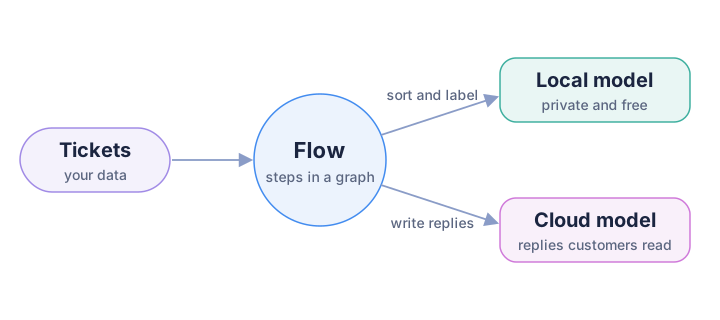
One flow, two models: the local model sorts and labels tickets, and the cloud model writes the replies customers read.
The coding agent writes the tool, and Intelli runs it on whatever models you choose. That split is good for the budget, because the expensive model works once, while the tool is built. It also means this isn't the Claude Agent SDK, which puts Claude itself inside your app.
What your developers hand over: three small files
The rest of the setup is for the developer who does it. If you manage the work, you can skip ahead to the three use cases.
A coding agent decides how to write code from what it reads first: the instruction files in your repo and the docs it looks up. So the handoff has three parts.
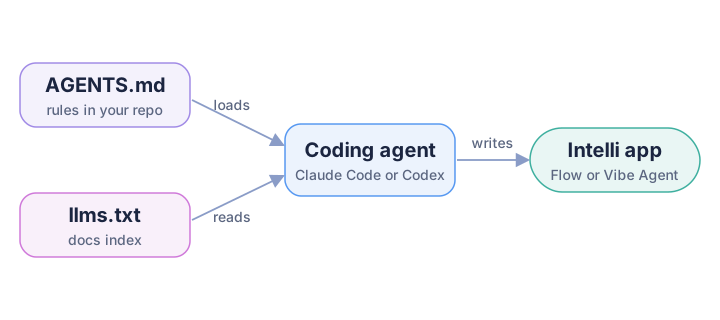
AGENTS.md is always loaded with the short rules, llms.txt is where the agent looks up anything else, and with both it writes a working Intelli app.
- AGENTS.md is a Markdown file of project rules the agent loads at the start of every session. It's always in context, so it holds only short lines.
- A skill is a folder with a
SKILL.mdfile. The agent sees its name and description until a task needs it, then loads the longer how-to. - llms.txt is an index of every docs page with a one-line note each, for anything else.
Short and curated beats a pile of docs. In LangChain's test of Claude Code on LangGraph tasks, a condensed CLAUDE.md guide beat docs access through an MCP server (a tool server the agent can call) alone, and on one task cost about 2.5 times less. The guide plus docs access did best, the same split as AGENTS.md plus llms.txt.
Step 1: Add an Intelli section to AGENTS.md
Start with the part the agent always sees. Paste this section into the AGENTS.md at your repo root, or create the file. Every API in it was checked against Intelli 2.0.3 by running code, and each pitfall is something that failed quietly in our tests.
## Using Intelli (Python) to build agent flows

Install with `pip install intelli` (2.0.3) and import from `intelli.flow`:
`from intelli.flow import Agent, Task, TextTaskInput, Flow, SequenceFlow, DynamicConnector, Memory, VibeAgent`

Agents and tasks
- Cloud: `Agent("text", "openai", "mission", {"key": os.environ["OPENAI_API_KEY"], "model": "<model>"})`. Never hardcode keys.
- Local, no key (Ollama or vLLM): `Agent("text", "vllm", "mission", {"model": "<ollama tag>", "temperature": 0.2, "max_tokens": 300}, options={"baseUrl": "http://localhost:11434"})`
- `Task(TextTaskInput("instruction"), agent, post_process=fn, memory_key="name", exclude=False, template=obj)`
- The default temperature is 1. Set `temperature` in model_params for labels and extraction.

Flow (async graph)
- `flow = Flow(tasks={"a": ta, "b": tb, "c": tc}, map_paths={"a": ["c"], "b": ["c"]}, memory=Memory())`
- `out = await flow.start(initial_input=text, max_workers=4)`, then read `out["c"]["output"]`. Every task with no parent gets `initial_input`, and tasks that are ready at the same time run in parallel.
- A task with several parents gets their outputs joined. If its mission contains "synthesize" or "integrate", each part is labeled with the parent's name.
- Routing: `dynamic_connectors={"a": DynamicConnector(decision_fn=lambda out, kind: "x", destinations={"x": "task_x", "y": "task_y"})}`. Only the chosen task runs (4 destinations at most).
- Task failures do not raise. Check `flow.errors` (a dict) after every run.
- `SequenceFlow([t1, t2]).start()` is synchronous and returns `{"task1": ..., "task2": ...}`.
- Diagram: `flow.generate_graph_img(name="graph", save_path=".", show_legend=False)` (needs matplotlib).

Vibe Agents (a flow from a plain language intent)
- `va = VibeAgent(planner_provider="anthropic", planner_api_key=os.environ["ANTHROPIC_API_KEY"], planner_model="<model>")`, then `flow = await va.build(intent, save_dir="bundle")`
- Reload without planning: `flow = va.build_from_spec(va.load_bundle("bundle/vibeflow_bundle.json"))`. The bundle stores the spec path exactly as given, so pass an absolute `save_dir`, or load with `va.load_spec("bundle/flow_spec.json")`.
- You can be the planner: write the FlowSpec JSON yourself and call `va.build_from_spec(spec)`, or pass `planner_fn=lambda system, user: spec`.
- Put `${ENV:NAME}` in specs, never keys. An unset variable stays as literal text, so check the environment first.
- Before `flow.start()`, check each `flow.tasks[name].agent.provider`. A task without `agent.agent_type` skips validation and defaults to `openai`.
- Register processors every time you load a spec: `VibeAgent(processors={"name": fn})`. Unknown `post_process` names are skipped silently.

Pitfalls
- Never make one task depend on two branches of the same DynamicConnector. Only one branch runs, so that task never runs, and nothing errors.
- `memory_key` replaces the input from parent tasks. With a list of keys, each value is cut to 100 characters.
- An empty string from memory makes the task run on its description alone. Store "(none)" instead.
- `TextInputTemplate` does not fill `{0}`; it appends the input. For exact prompts, pass any object with `apply_input(data) -> str` as `template=`.
- Tiny local models are poor planners and labelers: qwen2.5:0.5b produced 0 valid VibeAgent specs in 42 tries. For a local planner, set `max_context_chars=0` (the default prompt is about 96k characters, and `context_files=[]` does not shrink it).
The import line and the pitfalls keep the agent's first draft runnable, so your team spends review time on the business rules instead of the plumbing. The pitfalls matter most, because those failures don't raise errors, so one test run won't reveal them.
Codex
Codex walks from the repository root down to your working directory. In each folder it reads AGENTS.override.md if it exists, otherwise AGENTS.md, and joins them root first, so the file closest to your working directory wins. It stops adding files at project_doc_max_bytes, 32 KiB by default; this section is about 3.5 KB. To see what loaded, the Codex AGENTS.md guide suggests codex --ask-for-approval never "Summarize the current instructions.".
Claude Code
Since v2.1.277 (September 18, 2026), Claude Code reads AGENTS.md on its own, but only when there's no CLAUDE.md, .claude/CLAUDE.md or CLAUDE.local.md in your working directory or above it. If you have a CLAUDE.md, import the shared file at the top:
@AGENTS.md

Use plan mode before adding a new flow under apps/.
Or set Project instructions to claude-md-and-agents-md in /config. Then run /memory and look for the AGENTS.md path. The Claude Code memory docs list the sessions that still need the import.
| Claude Code | Codex | |
|---|---|---|
| Instructions file | CLAUDE.md, or AGENTS.md when no CLAUDE.md exists | AGENTS.md (AGENTS.override.md wins in the same folder) |
| Project skills folder | .claude/skills/<name>/SKILL.md | .agents/skills/<name>/SKILL.md |
| Invoke a skill | /intelli-flows | $intelli-flows, or pick it from /skills |
| Check what loaded | /memory for AGENTS.md, /skills for skills | "Summarize the current instructions.", /skills |
Step 2: Point your agent at llms.txt
AGENTS.md can't hold a whole framework, and it shouldn't try. For everything else, give the agent an index of the docs.
The llms.txt format was proposed by Jeremy Howard in September 2024: an H1 naming the project, a short summary in a blockquote, then H2 sections of links, each with a one-line note. An agent reads the notes, picks a page and fetches only that.
IntelliNode's index lives at www.intellinode.ai/llms.txt and is rebuilt on every deploy, with sections for Intelli for Python, IntelliNode for Node.js and Articles. The first lines, trimmed:
# IntelliNode

> Open source AI framework with two libraries: Intelli for Python (pip install intelli) and IntelliNode for Node.js (npm i intellinode). ...

## Intelli for Python: Flows

- [Async AI Workflows in Python](https://www.intellinode.ai/docs/python/flows/async-flow): Learn to build asynchronous DAG workflows in Python Intelli with agents, tasks, dependencies, logging, ...
- [Dynamic Workflow Routing in Python](https://www.intellinode.ai/docs/python/flows/dynamic-path): Learn to route Intelli workflows at runtime with DynamicConnector, decision functions, and utilities ...
Add one line at the end of the Intelli section in AGENTS.md:
- Docs index: https://www.intellinode.ai/llms.txt (local copy: docs/intellinode-llms.txt). Before using an Intelli API that is not listed above, open the matching page from the index.
When the support team asks for one more feature later, a request can send the agent to the right page:
Read docs/intellinode-llms.txt, open the page about loop tasks, and add a LoopTask to triage.py
that rewrites the customer reply until it is under 80 words. Tell me which pages you used.
Codex's web search is cached by default, so a new page may be missing. Run codex --search for live results, or keep a copy in the repo:
curl -s https://www.intellinode.ai/llms.txt -o docs/intellinode-llms.txt
Claude Code's own docs publish one too, at https://code.claude.com/docs/llms.txt.
Step 3: Package it as a skill for Claude Code and Codex
The AGENTS.md section costs context in every session, even ones that never touch Intelli, so the longer how-to belongs in a skill. Both tools list each skill's name and description up front and load the body only when a task matches or you call it by name. Both follow the Agent Skills format, so one folder serves both.
This SKILL.md holds the FlowSpec shape (the JSON a Vibe Agent runs from), the rule for processors (Python functions that check each task's output) and a check that every step stays on the model you approved:
---
name: intelli-flows
description: Use when writing or changing Python code that builds an AI agent app with Intelli (intelli.flow), such as a Flow graph, routing with DynamicConnector, Memory, or a Vibe Agent and its FlowSpec JSON. Not for IntelliNode on Node.js.
---

# Writing Intelli flows

Follow the Intelli section of AGENTS.md, then these rules.

1. Run every agent on local Ollama unless the user names a cloud provider:
   provider "vllm", options {"baseUrl": "${ENV:OLLAMA_BASE_URL}"} in specs, http://localhost:11434 in code.
2. For a Vibe Agent you are the planner. Write the FlowSpec JSON yourself, save it in the repo,
   and load it with `planner_fn` or `build_from_spec`. Use this shape:

   {"version": "1",
    "tasks": [{"name": "thread", "desc": "what the task does", "post_process": "flag_new_numbers",
               "agent": {"agent_type": "text", "provider": "vllm", "mission": "who the agent is",
                         "model_params": {"model": "qwen2.5:0.5b", "temperature": 0.3, "max_tokens": 300},
                         "options": {"baseUrl": "${ENV:OLLAMA_BASE_URL}"}}}],
    "map_paths": {}, "dynamic_connectors": [], "output_memory_map": {}}

3. Every task needs `agent.agent_type`. Without it validation is skipped and the provider becomes openai.
4. Name each `post_process` in the spec and register the same names with `VibeAgent(processors=...)`
   every time the spec is loaded. Unknown names are skipped silently.
5. Before `flow.start()`, loop over `flow.tasks` and raise if any `agent.provider` is not the one
   the user asked for. After every run, raise if `flow.errors` is not empty.
6. For anything else, fetch https://www.intellinode.ai/llms.txt and open the page it lists.
Codex looks for project skills in .agents/skills and Claude Code only in .claude/skills. Both follow a symlinked skill folder, so keep one copy. Codex requires name and description in the file; Claude Code defaults the name to the folder:
mkdir -p .agents/skills/intelli-flows .claude/skills
# save the SKILL.md above as .agents/skills/intelli-flows/SKILL.md, then:
ln -s ../../.agents/skills/intelli-flows .claude/skills/intelli-flows
Call it with /intelli-flows in Claude Code or $intelli-flows in Codex, or let either tool pick it from the description, and run /skills to confirm it's listed. We checked the paths against both tools' docs, not in live sessions.
Build AI agents with Claude Code: three AI agent use cases for business
With the setup done, the request is the part that matters. Each use case below starts with the business problem, then what someone on the team types into Claude Code or Codex, then the code the agent should end up with when it follows the AGENTS.md section.
Where the code came from: a Claude coding agent produced it from each request plus the AGENTS.md section, and we trimmed it for this page. It isn't a transcript of a Claude Code session, and we made no Codex run, though the same files work there. Every tool ran end to end on qwen2.5:0.5b, a tiny model, in Ollama, a free local model server, with no API keys.
The tools share two helpers. Intelli's vllm provider talks to any OpenAI-compatible server, which Ollama is:
# helpers.py: every agent talks to local Ollama, so no API key is needed
from intelli.flow import Agent

OLLAMA = {"baseUrl": "http://localhost:11434"}
MODEL = "qwen2.5:0.5b"  # change to a bigger model for real labels


def local_agent(mission, max_tokens=300, temperature=0.2):
    return Agent("text", "vllm", mission,
                 {"model": MODEL, "temperature": temperature, "max_tokens": max_tokens},
                 options=OLLAMA)


class Prompt:
    """A task template: any object with apply_input(data) works."""

    def __init__(self, text):
        self.text = text

    def apply_input(self, data):
        return self.text.replace("{input}", str(data))
Prompt exists because the built-in TextInputTemplate never fills {0}; it appends the input, and small models echo the leftover text back.
Use case 1: Customer support automation that gets urgent tickets to an engineer
The support team's problem is speed. An outage report shouldn't wait in the same queue as a dark mode request. This tool labels each ticket, writes a one-line summary, and sends urgent tickets to the on-call engineer with an escalation note, while the rest get a drafted reply for an agent to review.
Build a support ticket triage tool with Intelli. For each ticket, run three steps in parallel:
pick a category (billing, bug, account, feature), rate urgency (high, medium, low) and write a
one line summary. High urgency tickets get an escalation note for the on-call engineer; the rest
get a drafted customer reply. Run it on a local model and write a triage.md report.
A Flow is an async graph of tasks. map_paths says which task feeds which, and every task with no parent gets the input, so category, urgency and summary run in parallel. A DynamicConnector picks the next task at run time from a task's output, here the escalation note or the reply. Memory is a key-value store the flow shares, and memory_key swaps a task's input for a stored value, so the escalation note sees the ticket rather than the word "high".
# triage.py: support ticket triage with a Flow graph and a router
import asyncio

from intelli.flow import Flow, Task, TextTaskInput, DynamicConnector, ConnectorMode, Memory

from helpers import local_agent, Prompt

TICKETS = [
    "I was charged twice for my March invoice. Please refund the duplicate payment.",
    "Your API has returned 500 errors for every request since 9am. Our checkout is down and we are losing sales.",
    "How do I change the email address on my account?",
    "It would be great to have a dark mode in the dashboard.",
    "Someone logged into my account from another country and changed my password. I am locked out.",
    "The CSV export button does nothing in Safari. It works in Chrome.",
]


def step(instruction, mission, max_tokens, temperature=0.2, **options):
    """One task that always sees the ticket first, then the instruction."""
    return Task(TextTaskInput(instruction), local_agent(mission, max_tokens, temperature),
                template=Prompt("Support ticket:\n{input}\n\n" + instruction), **options)


def label(allowed, fallback):
    """post_process: map a small model's free text onto one allowed word."""
    return lambda text: next((word for word in allowed if word in str(text).lower()), fallback)


def build_flow(memory):
    tasks = {
        "category": step("Classify the support ticket into one category: billing, bug, account or feature. "
                         "Answer with the category word only.", "You are a support ticket classifier.", 5, 0,
                         post_process=label(["billing", "bug", "account", "feature"], "other")),
        "urgency": step("Rate the urgency as high, medium or low. High means a service is down, money is "
                        "being lost or an account is compromised. Answer with one word.",
                        "You are a support triage lead.", 5, 0,
                        post_process=label(["high", "low"], "medium")),
        "summary": step("Summarize the customer's problem in one short sentence.",
                        "You summarize support tickets.", 60),
        "escalation": step("Write a 3 line escalation note for the on-call engineer: what is broken, "
                           "who is affected, and the first thing to check.",
                           "You are a senior support engineer.", 120, memory_key="ticket"),
        "reply": step("Write a short, polite reply to the customer that acknowledges the issue and gives "
                      "one next step. Do not promise refunds or dates.",
                      "You are a friendly support agent.", 120, memory_key="ticket"),
    }
    router = DynamicConnector(
        decision_fn=lambda output, output_type: "escalate" if output == "high" else "reply",
        destinations={"escalate": "escalation", "reply": "reply"},
        name="urgency_router",
        mode=ConnectorMode.CUSTOM,
    )
    return Flow(tasks=tasks, map_paths={}, dynamic_connectors={"urgency": router}, memory=memory)


async def triage(ticket):
    memory = Memory()
    memory.store("ticket", ticket)  # escalation and reply read the original ticket from here
    flow = build_flow(memory)
    out = await flow.start(initial_input=ticket, initial_input_type="text")
    if flow.errors:  # failed tasks are recorded here, not raised
        raise RuntimeError(flow.errors)
    route = "escalation" if "escalation" in out else "reply"
    result = {name: out[name]["output"].strip() for name in ("category", "urgency", "summary", route)}
    result["route"] = route
    return result


async def main():
    lines = ["# Ticket triage", ""]
    for ticket in TICKETS:
        result = await triage(ticket)
        print(f"[{result['category']:8}|{result['urgency']:6}] -> {result['route']:10} {ticket[:45]}")
        lines += [f"## {result['category']} / {result['urgency']}", f"> {ticket}", "",
                  result["summary"], "", f"**{result['route']}:** {result[result['route']]}", ""]
    with open("triage.md", "w") as f:
        f.write("\n".join(lines))


if __name__ == "__main__":
    asyncio.run(main())
[billing |high  ] -> escalation I was charged twice for my March invoice. Ple
[feature |high  ] -> escalation Your API has returned 500 errors for every re
[account |high  ] -> escalation How do I change the email address on my accou
[account |high  ] -> escalation It would be great to have a dark mode in the
[account |high  ] -> escalation Someone logged into my account from another c
[account |low   ] -> reply      The CSV export button does nothing in Safari.
The plumbing held: six tickets in about five seconds, no flow.errors, and exactly one of escalation or reply per ticket. The labels didn't. At temperature 0, category was right for 3 of 6 tickets and urgency for 2 of 6 (2 and 0 with the default template). The model rated 5 of 6 tickets high, so a dark mode request got an escalation note, and it filed the API outage as a feature. That's fine for a demo and not for a real inbox: change MODEL to a bigger model before anyone relies on the labels, and the graph stays the same. For a PNG of the graph to share with the support lead, call build_flow(Memory()).generate_graph_img(name="triage_graph", save_path=".", show_legend=False). The dynamic routing docs cover the other router modes.
Use case 2: A weekly release brief for customers and sales
Every Friday someone spends an hour turning commit messages into an update that customers and the sales team can read. This tool takes the week's commits and writes that brief in a few seconds, ready for a person to check and send.
Every Friday I paste the week's commit messages. Use Intelli to turn them into a short release
brief for the team: a features section, a fixes section and a risks section, written in parallel,
then one brief with a headline. Run it locally and save brief.md.
Plain Python sorts the commits by their feat: and fix: prefixes, because code does that perfectly and a tiny model doesn't. Three section writers run in parallel, each reading its own list from Memory. The brief task has all three as parents, and because its mission says "synthesize", Flow labels each parent's output before joining them. output_memory_map copies the finished brief into Memory as brief_md.
# release_brief.py: a weekly release brief from commit messages
import asyncio

from intelli.flow import Flow, Task, TextTaskInput, Memory

from helpers import local_agent, Prompt

COMMITS = """\
feat(editor): add markdown tables to the note editor
feat(sync): offline edits now sync when the device reconnects
feat(search): search inside PDF attachments
fix(sync): duplicate notes created after a sync conflict
fix(ios): app crashed when sharing a note with an emoji title
fix(api): rate limit returned 500 instead of 429
perf(search): index builds 2x faster on large workspaces
feat!: remove the legacy v1 export API
chore(deps): upgrade sqlite to 3.46
refactor(sync): split conflict resolver into its own module
docs: document the new export API
"""


def group_commits(text):
    """Plain Python sorts conventional commits better than a small model does."""
    groups = {"features": [], "fixes": [], "risks": []}
    for line in filter(None, map(str.strip, text.splitlines())):
        prefix, _, subject = line.partition(":")
        subject = subject.strip()
        if "!" in prefix:
            groups["risks"].append(subject + " (breaking change)")
        elif prefix.startswith("feat"):
            groups["features"].append(subject)
        elif prefix.startswith(("fix", "perf")):
            groups["fixes"].append(subject)
        elif prefix.startswith(("chore(deps)", "refactor")):
            groups["risks"].append(subject + " (internal change, watch for regressions)")
    # never store an empty string: the task would run on its instruction alone and invent items
    return {name: "\n".join(f"- {s}" for s in items) or "(none this week)" for name, items in groups.items()}


def section(title, instruction):
    return Task(TextTaskInput(instruction),
                local_agent(f"You write the {title} section of a weekly release brief.", 200),
                template=Prompt(f"{title} commits this week:\n{{input}}\n\n{instruction} Use only the commits above."),
                memory_key=title.lower())


def build_flow(memory):
    tasks = {
        "features": section("Features", "Rewrite each commit as one plain-English bullet for users."),
        "fixes": section("Fixes", "Rewrite each commit as one plain-English bullet."),
        "risks": section("Risks", "For each item, say in one bullet what could break and who should check it."),
        "brief": Task(
            TextTaskInput("Write the weekly release brief."),
            # "synthesize" in the mission makes Flow label each section in the merged input
            local_agent("You synthesize section drafts into one weekly release brief. Do not add new items.", 400),
            template=Prompt("Section drafts:\n{input}\n\nWrite the weekly release brief in markdown with the "
                            "sections Features, Fixes and Risks. Keep every item, add nothing new."),
        ),
        "headline": Task(
            TextTaskInput("Write one headline for the brief."),
            local_agent("You write short headlines.", 30),
            template=Prompt("Release brief:\n{input}\n\nWrite one headline under 12 words for this brief. "
                            "Answer with the headline only."),
        ),
    }
    return Flow(
        tasks=tasks,
        map_paths={"features": ["brief"], "fixes": ["brief"], "risks": ["brief"], "brief": ["headline"]},
        memory=memory,
        output_memory_map={"brief": "brief_md"},
    )


async def main():
    memory = Memory()
    for name, items in group_commits(COMMITS).items():
        memory.store(name, items)
    flow = build_flow(memory)
    out = await flow.start(max_workers=4)
    if flow.errors:
        raise RuntimeError(flow.errors)
    headline = out["headline"]["output"].strip().strip('"')
    with open("brief.md", "w") as f:
        f.write(f"# {headline}\n\n{memory.retrieve('brief_md').strip()}\n")
    print(headline)


if __name__ == "__main__":
    asyncio.run(main())
Over five runs it took 2.8 to 4.5 seconds, with no errors and brief_md stored every time. The section writers, each with a short, narrow input, stayed faithful. The merge step drifted: it kept 7 to 10 of the 10 sorted commits, explained "rate limit returned 500 instead of 429" as a performance improvement, and copied Flow's labels into its headings ("Features Output") every time. The headline step often just returned the brief's first line.
The lesson holds for any model, and it's why a person still reads the brief before it goes out: let code do the grouping, and keep each model step short and narrow. The async flow docs cover more graph shapes.
Use case 3: One blog post, four channels, with a Vibe Agent
Marketing wants every blog post turned into a tweet thread, a LinkedIn post, a newsletter blurb and a search snippet. Writing those by hand takes longer than most posts deserve. This time the tool is a Vibe Agent, which builds the graph from a sentence instead of Python: a planner model turns your plain English into a FlowSpec (JSON listing each task, its agent and how tasks connect), and VibeAgent validates it, builds the Flow and saves a bundle that reruns with no planning.
Use Intelli VibeAgent to build a content repurposing flow from a plain language intent: a blog
post goes in, and a tweet thread, a LinkedIn post, a newsletter blurb and an SEO meta description
come out, written in parallel. Save the generated spec so the same flow can be reloaded and run
again without planning. Run every task on local Ollama.
We first let qwen2.5:0.5b plan. Across our probes it produced a runnable local spec 0 times in 42 attempts. Most replies were broken JSON or failed validation, and three passed validation but sent tasks to OpenAI. With the ${ENV:OPENAI_API_KEY} placeholder the planner prompt suggests, that's a paid call on any machine where the key is set.
So let the strong model plan once and small models do the repeated work. That's the practical version of agents that write agents, and it keeps the cost of every later run close to zero:
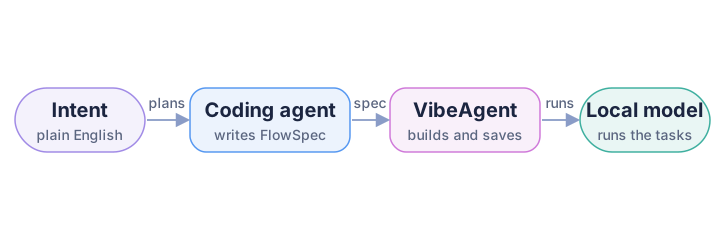
The coding agent turns the intent into a FlowSpec once, VibeAgent checks, builds and saves it, and a local model runs the tasks on every call with no planning step.
The coding agent writes repurpose_flowspec.json. ${ENV:OLLAMA_BASE_URL} keeps the address out of the file, and each post_process names a Python function:
{
  "version": "1",
  "tasks": [
    {"name": "thread", "post_process": "flag_new_numbers",
     "desc": "Write a thread of 4 short tweets about the blog post. Number them 1. to 4., one tweet per line. Use only facts from the post.",
     "agent": {"agent_type": "text", "provider": "vllm", "mission": "You turn blog posts into tweet threads.",
               "model_params": {"model": "qwen2.5:0.5b", "temperature": 0.3, "max_tokens": 300},
               "options": {"baseUrl": "${ENV:OLLAMA_BASE_URL}"}}},
    {"name": "linkedin", "post_process": "flag_new_numbers",
     "desc": "Write a LinkedIn post of 4 to 6 sentences from the blog post for engineering managers. Use only facts from the post.",
     "agent": {"agent_type": "text", "provider": "vllm", "mission": "You write clear LinkedIn posts.",
               "model_params": {"model": "qwen2.5:0.5b", "temperature": 0.3, "max_tokens": 300},
               "options": {"baseUrl": "${ENV:OLLAMA_BASE_URL}"}}},
    {"name": "newsletter", "post_process": "flag_new_numbers",
     "desc": "Write a 3 sentence newsletter blurb that makes readers want to open the blog post. Use only facts from the post.",
     "agent": {"agent_type": "text", "provider": "vllm", "mission": "You write newsletter blurbs.",
               "model_params": {"model": "qwen2.5:0.5b", "temperature": 0.3, "max_tokens": 200},
               "options": {"baseUrl": "${ENV:OLLAMA_BASE_URL}"}}},
    {"name": "meta", "post_process": "check_meta",
     "desc": "Write one SEO meta description for the blog post, under 155 characters. Answer with the description only.",
     "agent": {"agent_type": "text", "provider": "vllm", "mission": "You write SEO meta descriptions.",
               "model_params": {"model": "qwen2.5:0.5b", "temperature": 0.2, "max_tokens": 80},
               "options": {"baseUrl": "${ENV:OLLAMA_BASE_URL}"}}}
  ],
  "map_paths": {},
  "dynamic_connectors": [],
  "output_memory_map": {},
  "max_workers": 4,
  "log": false
}
planner_fn hands that spec to VibeAgent instead of calling a model. With save_dir, build() also writes flow_spec.json, vibeflow_bundle.json and a graph PNG, and later runs load the bundle in a fresh VibeAgent:
# repurpose.py: a Vibe Agent whose FlowSpec was written by the coding agent
import asyncio
import json
import os
import re
import sys
from pathlib import Path

from intelli.flow import VibeAgent

HERE = Path(__file__).resolve().parent
BUNDLE = HERE / "bundle"  # absolute, so the bundle loads from any working directory
LOCAL = {"baseUrl": "http://localhost:11434"}
os.environ.setdefault("OLLAMA_BASE_URL", LOCAL["baseUrl"])  # fills ${ENV:OLLAMA_BASE_URL} in the spec

INTENT = ("Turn a blog post into a 4 tweet thread, a LinkedIn post, a 3 sentence newsletter blurb "
          "and an SEO meta description under 155 characters, written in parallel on local Ollama.")
POST = (HERE / "post.md").read_text()
SOURCE_NUMBERS = set(re.findall(r"\d+(?:\.\d+)?", POST))


def new_numbers(text):
    return sorted(set(re.findall(r"\d+(?:\.\d+)?", text)) - SOURCE_NUMBERS - {"1", "2", "3", "4"})


def flag_new_numbers(text):
    extra = new_numbers(str(text))
    return f"{text}\n\n[check] numbers not in the post: {', '.join(extra)}" if extra else text


def check_meta(text):
    text = str(text).strip().strip('"')
    notes = ([f"too long ({len(text)} chars)"] if len(text) > 155 else []) + new_numbers(text)
    return text + (f"\n\n[check] {', '.join(notes)}" if notes else "")


PROCESSORS = {"flag_new_numbers": flag_new_numbers, "check_meta": check_meta}


def assert_local_only(flow):
    """Refuse to run a flow that would call anything but local Ollama."""
    for name, task in flow.tasks.items():
        base = str((task.agent.options or {}).get("baseUrl", ""))
        if task.agent.provider != "vllm" or not base.startswith(LOCAL["baseUrl"]):
            raise ValueError(f"task {name!r} is not local: {task.agent.provider} {base}")


def coding_agent_planner(system_prompt, user_prompt):
    """planner_fn: Claude Code or Codex already wrote the spec, so no model plans here."""
    return json.loads((HERE / "repurpose_flowspec.json").read_text())


async def build_once():
    va = VibeAgent(planner_provider="vllm", planner_model="qwen2.5:0.5b", planner_options=LOCAL,
                   planner_fn=coding_agent_planner, processors=PROCESSORS)
    flow = await va.build(INTENT, save_dir=str(BUNDLE))  # validates, builds and saves the bundle
    assert_local_only(flow)


async def run_saved(post):
    # a fresh agent with no planning step; processors are not saved, so register them again
    runner = VibeAgent(planner_provider="vllm", planner_options=LOCAL, processors=PROCESSORS)
    flow = runner.build_from_spec(runner.load_bundle(str(BUNDLE / "vibeflow_bundle.json")))
    assert_local_only(flow)
    out = await flow.start(initial_input=post, max_workers=4)
    if flow.errors:
        raise RuntimeError(flow.errors)
    return {name: str(out[name]["output"]).strip() for name in ("thread", "linkedin", "newsletter", "meta")}


if __name__ == "__main__":
    if "--build" in sys.argv:
        asyncio.run(build_once())
    for name, text in asyncio.run(run_saved(POST)).items():
        print(f"## {name}\n\n{text}\n")
Run python repurpose.py --build once, then python repurpose.py for each new post in post.md. On a post about cutting CI time from 22 minutes to 9, each run took 2.4 to 3.5 seconds, even from another folder. The number check caught invented figures such as a "95%" cache hit rate, but not real numbers on the wrong fact: one LinkedIn draft turned the 91% cache hit rate into "a 91% increase in cache utilization". A meta description listed batched changes as a fix, though batching was the original problem. Drafts like these save the marketing team the blank page, and someone still edits them before they're published.
For a cloud planner, the documented constructor is below. We didn't run it, since it's a paid call:
async def build_with_cloud_planner():
    va = VibeAgent(planner_provider="anthropic", planner_api_key=os.environ["ANTHROPIC_API_KEY"],
                   planner_model="claude-sonnet-5", processors=PROCESSORS)
    return await va.build(INTENT, save_dir=str(BUNDLE))
The Vibe Agents docs cover edit() for changing a saved flow with a new instruction.
A multi-model AI strategy: choose a model for each step
The three tools ran on one tiny local model, and the results show where that's enough and where it isn't. Sorting commits and running in parallel worked. Labels, merged summaries and marketing copy need a stronger model. With a multi-model backend you fix that one step at a time instead of moving the whole tool.
A cloud step is one more helper next to local_agent:
# helpers.py (addition): a cloud agent for the steps customers read
import os


def claude_agent(mission, max_tokens=300):
    return Agent("text", "anthropic", mission,
                 {"key": os.environ["ANTHROPIC_API_KEY"], "model": "claude-sonnet-5", "max_tokens": max_tokens})
Use it for the tasks customers read, such as the reply in the triage tool, and leave the labels and checks on the local model. The flow, the routing and the reports stay as they are. We ran that mix with a stand-in for the Claude call, since a real one is paid.
For a manager, this is where the cost and risk decisions sit:
- Cost. Building a tool uses the coding agent you already pay for. Running it is a separate bill that depends on the model behind each step, and local steps cost nothing per call.
- Data. Decide per step what may leave your network. Ticket text can stay on a local model while a cloud model only sees a short summary.
- Vendor lock-in. To avoid AI vendor lock-in, keep the model choice on the step, not in the tool's structure. To compare two vendors, change the provider and model on one step and run the same inputs through both.
- Planning. For Vibe Agents, planning happens once and the saved bundle runs with no planner call, so a strong planner adds almost nothing to the monthly cost.
Check the generated tool before your team relies on it
Each tool above had a way to fail without telling you. Before your team relies on code a coding agent wrote with Intelli, check these, each confirmed by running code:
- Read
flow.errorsafter every run. A failed task becomes an "Error: ..." string in the output, andstart()doesn't raise. - Check every task's provider before
start(). A spec task withoutagent_typeskips validation and defaults to openai. - Register processors on every load. They aren't saved with the spec, and unknown names are skipped silently.
- Use an absolute
save_dir. The bundle stores the spec path as given, so a relative one breaks from another folder. - Set the environment first. An unset
${ENV:X}stays as literal text instead of raising. - Never make one task depend on two branches of the same DynamicConnector. Only one branch runs, so that task never runs, and nothing errors.
These lines earn their place in AGENTS.md, because none of them shows up until something breaks.
Do you need MCP or Context7?
The setup so far is plain files. The other common way to feed docs to an agent is an MCP server. For this job you don't need one: plain files add no dependency, and LangChain's results favor a short guide. Context7 is a good option for widely used libraries. Its MCP server pulls version-specific docs into the agent's context, and npx ctx7 setup configures it for Claude Code.
IntelliNode's own MCP server does a different job. It gives your coding agent 15 cross-provider tools, such as review_code, generate_unit_tests and consensus:
claude mcp add intellinode -- npx -y intellinode mcp
We started it from the IntelliNode repo rather than through npx, with no keys, and listed its tools; tool calls need provider keys, as the MCP server docs describe. It doesn't teach the agent Intelli flows. That's the AGENTS.md section's job.
FAQ
What are good AI agent use cases for a business?
Start with work that is repetitive, heavy on text and easy for a person to check. This guide builds three: customer support automation that sorts tickets and escalates urgent ones, a weekly release brief written from commit messages, and one blog post turned into posts for four channels.
How do you avoid AI vendor lock-in with AI agents?
Keep the model choice out of the tool's structure. In an Intelli flow every step has its own agent, and each agent names its provider and model, so one workflow can sort tickets on a local model and write replies with Claude or GPT. Moving a step to another vendor is a small change. Agentic Workflows in Python mixes three providers in one flow.
How much does it cost to run AI agents like these?
There are two bills. Building a tool uses the coding agent subscription your developers already have. Running it depends on the model behind each step: steps on a local model cost nothing per call, and cloud steps are billed by the vendor per token. Start local, then move only the steps customers read.
Does Claude Code read AGENTS.md?
Yes, from v2.1.277, and only when there's no CLAUDE.md, .claude/CLAUDE.md or CLAUDE.local.md in your working directory or above it. Otherwise put @AGENTS.md at the top of CLAUDE.md, or set Project instructions to claude-md-and-agents-md in /config. Run /memory to check.
AGENTS.md vs CLAUDE.md: do I need both?
No. If your team uses both tools, keep the shared rules in AGENTS.md so both read the same lines. Add a CLAUDE.md only for Claude-specific notes, starting with @AGENTS.md.
Does Codex read llms.txt?
Only when something points it there; nothing in the Codex docs says it looks for one on its own. Add the line to AGENTS.md, and because web search is cached by default, run codex --search or keep a local copy.
Can these AI tools run without an API key?
Yes. Every tool here uses Intelli's vllm provider pointed at Ollama on localhost:11434, which needs no key. For a self-hosted vLLM server, see the vLLM integration page.
Next step
Pick the request your team asks for most. Have a developer copy the AGENTS.md section into the repo, add the llms.txt line, and give the coding agent the request from that use case. Run the result on your own tickets, commits or posts, then decide which steps deserve a stronger model.
When you want the agent to plan whole flows, start from the Vibe Agents docs. How to Build an AI Agent in Python writes an agent loop by hand, and Agentic Workflows in Python covers the patterns behind these tools.