
Think of a small e-commerce business that sells shirts, hoodies and mugs on its own website. Every Monday the owner opens the stock system, exports a spreadsheet and works out by hand what is about to sell out and how many to order from each supplier. During the week, the person answering customers keeps asking the same thing in the team chat: do we still have the grey hoodie in medium?
All of those answers already sit in the store's inventory system, behind an API. The AI assistant the team uses every day cannot see any of it.
MCP fixes that. The Model Context Protocol is an open standard that lets AI apps such as Claude, Cursor and VS Code call your systems as tools. In this guide we build an MCP server in Node.js with IntelliNode, put it in front of the inventory API, connect it to Claude Code, and then use the same server from a small Node script that drafts the Monday purchase orders.

MCP server vs API: what changes
Nothing changes in your API. It keeps serving the website, the warehouse app and whatever else already uses it. What it does not do is explain itself to a model. An endpoint like GET /low-stock?days=14 makes sense to the developer who wrote it, but a model has no idea it exists or when to call it.
The MCP server is a thin layer that sits in front of the API and describes a few tasks in plain words, such as "list the products that will sell out within the given number of days". The AI app shows those descriptions to the model, the model picks one, and the server makes the real API call with your key.
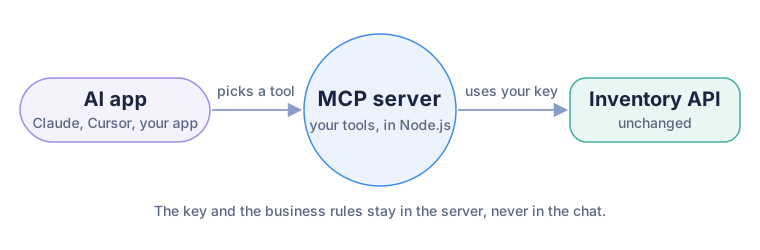
The app talks to the MCP server, and only the server talks to your API.
The real work is picking the tasks. You do not need one tool per endpoint. Our store gets three: look up one product, list what is running low, and draft a purchase order. The first two only read. The third one writes, and we will spend a whole step on making that safe.
The guide uses three small files: a stand-in for your inventory API, the MCP server, and a reorder report script. Download them, or open each one from the links in the steps.
Then in a terminal, open the folder you unzipped and install IntelliNode:
npm install
You need IntelliNode 3.1.1 or above and Node.js 18 or above. The MCP server in IntelliNode has no other dependencies, so that one package is all you install.
Step 1: Start the API, or use your own
The example comes with inventory_api.js, a tiny inventory API with six products. Each product has its stock, its average daily sales, its supplier and how many days that supplier needs to deliver. Like most internal APIs, it refuses any request that does not carry an API key. Start it and leave it running:
node inventory_api.js
It answers on http://localhost:8001. When you move to your real API, set INVENTORY_API_URL and INVENTORY_API_KEY before starting the MCP server. Nothing else in this guide has to change.
Step 2: Describe your tasks as tools
Open inventory_mcp_server.js. In IntelliNode, an MCP tool is a name, a description, a JSON Schema for its inputs and a handler function:
const { MCPServer } = require('intellinode');

const server = new MCPServer({
  name: 'inventory',
  version: '1.0.0',
  tools: [{
    name: 'check_stock',
    description: 'Find a product by SKU, such as SHIRT-BLK-M, or by words in its name, such as "grey hoodie". ' +
      'Returns units in stock, average daily sales, days of stock left and the supplier.',
    inputSchema: {
      type: 'object',
      properties: { query: { type: 'string', description: 'A SKU like SHIRT-BLK-M, or words from the product name' } },
      required: ['query'],
    },
    handler: async ({ query }) => { /* calls GET /products on your API */ },
  }],
});
If you have read the Python version of this guide, this is the main difference. Python builds the schema from type hints. In Node.js you write the JSON Schema yourself, which is more typing, but it also lets you say exactly what is allowed: a minimum and maximum for a number, or a list of items with their own fields.
The description is written for someone who has never seen your API, and it gives example values. "Such as SHIRT-BLK-M" saves the model a guess about what a SKU looks like.
What the handler returns matters too. Return a plain object, and IntelliNode sends it to the app as structured data plus a JSON text copy, so both new and older MCP clients can read it. Throw an error, and the app receives it as a failed tool call with your message. We use that on purpose for wrong input:
if (!matches.length) throw new Error(`No product matches "${query}". Try a SKU such as SHIRT-BLK-M.`);
When someone asks about socks, which the store does not sell, the model reads that sentence and asks for a better product name instead of making something up.
The API key never appears in a tool. Every handler goes through one callApi helper that adds the key header, so the key stays on the server and never reaches the model.
Step 3: Let a tool change data, safely
Looking things up is useful, but the Monday job is ordering. So the third tool, draft_purchase_order, writes to the API. Writing is where an MCP server can do real damage, so we gave it two limits.
First, it only creates a draft. The description says so in capital letters, the handler returns a note saying so, and the API stores the order with status: 'draft'. Nothing goes to the supplier until a person approves the draft in the inventory system they already use. That way the model can prepare the work, but it cannot spend money.
Second, the schema keeps quantities in a sane range:
quantity: { type: 'integer', minimum: 1, maximum: 1000 }
A model that misreads a number cannot order ten thousand mugs.
There was a third lesson, and we only learned it by running the example. In our first version, the model had to work out how many units to order. It was told to cover 30 days of sales plus the supplier's delivery time, minus the current stock. A small local model got the arithmetic wrong on every product: it suggested 89 black shirts when the right number was 198. So we moved the math into the tool. list_low_stock now adds a suggested_quantity to every product, computed in plain JavaScript:
for (const p of products) p.suggested_quantity = Math.max(0, Math.ceil(p.daily_sales * (30 + p.lead_days) - p.stock));
After that change, the same small model drafted the right quantities. The general rule: if a number can be calculated, calculate it in code and give the model the answer. Leave the model the parts that need language, such as choosing the tool and writing the report.
Step 4: Run it on your computer or share it
The same file runs in two modes, and the last lines pick one:
if (process.argv.includes('--http')) {
  server.startHttp({ port: 3210 }).then(({ url }) => console.error(`Inventory MCP server on ${url}`));
} else {
  server.startStdio();
}
The default, stdio, is for apps on your own computer. You never start it yourself. Claude Code, Cursor or VS Code start the server when they need it and talk to it through its input and output.
This is the easiest mistake to make in Node.js: in stdio mode, your server may print nothing to standard output except MCP messages. A single console.log('started') breaks the connection, and the app reports that the server failed without saying why. Use console.error for any logging, which goes to standard error and is safe.
To share the tools with your team, run the HTTP version instead:
node inventory_mcp_server.js --http
The tools are now at http://127.0.0.1:3210/mcp. By default the server listens only on your own machine and accepts browser requests only from localhost. startHttp also takes host, path and allowedOrigins, for when it moves to a server.
Step 5: Connect it to Claude Code, Cursor, VS Code or Codex
In Claude Code, add the server with one command. Use the full path to the file, because Claude Code starts it from its own folder:
claude mcp add --transport stdio inventory -- node /full/path/to/inventory_mcp_server.js
Codex takes almost the same command: codex mcp add inventory -- node /full/path/to/inventory_mcp_server.js. For the shared HTTP version in Claude Code, use claude mcp add --transport http inventory http://127.0.0.1:3210/mcp.
Type /mcp in Claude Code to check that the inventory server is connected with three tools. Then ask in plain words:
Do we still have the grey hoodie in medium, and when will it run out?
Claude should pick check_stock with "grey hoodie", ask your permission the first time, and answer from what your API returned: 9 in stock, about two sold a day, so roughly four days left.
Cursor reads the server from .cursor/mcp.json in your project. VS Code uses .vscode/mcp.json, with a slightly different shape:
{
  "servers": {
    "inventory": {
      "type": "stdio",
      "command": "node",
      "args": ["/full/path/to/inventory_mcp_server.js"],
      "env": { "INVENTORY_API_URL": "http://localhost:8001", "INVENTORY_API_KEY": "demo-key" }
    }
  }
}
For Cursor, the top key is mcpServers instead of servers, and you leave out the type line. The env block is where your real API's address and key go. They stay in that file on your computer, not in the chat.
Step 6: Use the same server from your own Node.js app
A chat answers one question at a time. The Monday reorder is better as a script that runs on its own and leaves the drafts ready before the owner logs in.
IntelliNode has the other side of MCP as well. MCPClient connects to any MCP server, and Chatbot.runTools gives its tools to a model and runs them until the model has an answer. reorder_report.js puts the two together:
const { Chatbot, ChatGPTInput, MCPClient } = require('intellinode');

const inventory = new MCPClient({ command: 'node', args: ['inventory_mcp_server.js'] });
await inventory.connect();

const input = new ChatGPTInput(SYSTEM, { model: 'gpt-5-mini' });
input.addUserMessage('What will run out in the next 14 days? Draft the purchase orders and write the report.');

const { text, steps } = await new Chatbot(process.env.OPENAI_API_KEY, 'openai').runTools(input, inventory, {
  maxSteps: 8,
  onToolCall: (name, args) => console.error(`> ${name} ${JSON.stringify(args)}`),
});
The client starts the MCP server by itself, the same way Claude Code does, so only inventory_api.js needs to be running. onToolCall prints every tool the model calls, with its arguments. That gives you a log of what happened, and it is also where you would stop a call that needs a person's approval. steps holds the full record afterwards.
Set your key and run it:
export OPENAI_API_KEY="your-key"
node reorder_report.js
To run it on Claude or Gemini instead, change two lines: the chatbot provider and the input class, such as new Chatbot(key, 'anthropic') with AnthropicInput. The MCP server stays exactly the same.
Run it on a free local model
The report also runs with no key and no cost per call, on a model on your own machine. Install Ollama, pull a small model and start the script with --local:
ollama pull qwen2.5:3b
node reorder_report.js --local
We tried it with Qwen2.5 3B, a 1.9 GB download, on a laptop. Each run took about nine seconds. On a good run it made three tool calls, and every number was right:
> list_low_stock {"days":14}
> draft_purchase_order {"supplier":"Northwind Textiles","items":[{"quantity":198,"sku":"SHIRT-BLK-M"},{"quantity":79,"sku":"HOOD-GRY-M"}]}
> draft_purchase_order {"supplier":"Clayworks","items":[{"quantity":125,"sku":"MUG-WHT"},{"quantity":105,"sku":"TOTE-NAT"}]}
It grouped the four products by supplier into two drafts, PO-1001 and PO-1002, with the suggested quantities from the tool.
Good runs were the minority, though. We ran the same script eight times. Only two runs created drafts, and one of those left the sold-out tote off the Clayworks order. In the other six, the model called list_low_stock and then stopped. It wrote a tidy report that described the purchase orders and even gave them IDs, but it never called draft_purchase_order, so nothing existed in the inventory system.
That is the failure to watch for with any model, and it is why the script does not trust the report. After the run it counts the draft_purchase_order calls in steps:
const drafts = steps.filter((step) => step.name === 'draft_purchase_order' && !step.isError);
if (drafts.length === 0) process.exitCode = 1;
When no draft was created, it says so and exits with an error, so a scheduled run that did nothing shows up as a failed job instead of a nice-looking report. Check what the model did, not what it says it did.
A 3B model is fine for trying the example for free. For orders you rely on, use a hosted model or a larger local one such as Qwen2.5 7B, and keep the check either way.
To get the drafts every Monday, run node reorder_report.js from cron or whichever scheduler you already use.
MCP server in Node.js or Python?
Both work, and any MCP app can use a server written in either language. Pick the language your API team already uses, because they will maintain the tools.
With IntelliNode in Node.js, the server needs nothing beyond the one package, the schemas are written out by hand, and the same library gives you MCPClient and the chatbot for the script side. With Intelli in Python, the schemas come from type hints, and an MCP server can be one step in a larger flow. The Python guide builds the same kind of server for an orders API.
Before you share it with your team
The example is ready to try. These habits make it ready for real data:
- Start with tools that only read. Add tools that write later, and make them create drafts that a person approves.
- Put limits in the schema, such as a maximum quantity, so a misread number cannot do much harm.
- Do the math in code and give the model the result, then check in code that the model really called the tools.
- Keep keys in environment variables on the server, never in a tool argument the model fills in.
- Return only the fields the task needs. If the model does not need the unit cost, the tool does not have to send it.
- Put the HTTP version behind a login.
startHttphas no login of its own, so run it behind the gateway or reverse proxy you already use for internal services. Claude Code can send a token with--header "Authorization: Bearer your-token", andMCPClienttakes the same header inheaders.
Where to go next
Your inventory API now works with any app that speaks MCP, and your Node.js scripts can use it too. From here:
- The MCP server and MCP client docs list every option, including timeouts, protocol versions and loading several servers from one config file.
- Tool calling covers
runToolswith OpenAI, Claude, Gemini, Mistral and local models. - IntelliNode also comes with a ready MCP server of its own.
npx -y intellinode mcpgives your coding assistant tools such as asking another model for a second opinion, code review and web search. The MCP get started page shows the setup. - Want a coding agent to build a server like this for your own API? Give IntelliNode to Claude Code or Codex.