
Take a small software company whose product has three AI features. The website has a support chatbot, the sales team has a tool that summarizes their calls, and a job runs every night to write product descriptions. The features were built at different times, so each one calls a model provider directly, with its own API key inside its own code.
This works well until the day one provider has an outage, or starts rejecting requests because of a rate limit. The chatbot stops answering in front of customers, and the only fix is to change its code and deploy it again. Some simple questions are also hard to answer in this setup. Nobody can say how much each feature costs per month, or whether the call summaries, which are full of customer details, should be going to a cloud model at all.
An AI gateway handles all of this in one place. In this guide we build a small one in Node.js with IntelliNode. The three features send their requests to one OpenAI-compatible endpoint. The gateway picks the provider, moves to the next one when a provider fails, keeps private requests on a local model, and writes one log line per call so you can see which feature used what.
What an AI gateway does
An AI gateway, also called an LLM gateway or LLM proxy, is a server that stands between your apps and the model providers. The apps stop talking to OpenAI, Anthropic or Google directly. They talk to the gateway, and the gateway holds the provider keys and decides where each request goes.
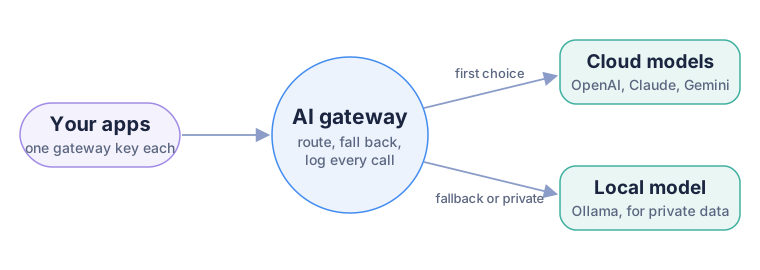
The apps know one address and one key. The gateway knows the providers.
Cloud platforms and several open-source projects offer complete gateways with dashboards, and for a large company one of those may be the right call. A small gateway of your own is worth building when you want to see every rule in plain code, keep it on your own server, and change it the same day a new model comes out. Ours is under 150 lines with its routes, and it does four jobs:
- Gives apps names such as
fast,smartandprivateinstead of model names. - Falls back to the next provider when one is rate limited, down or slow.
- Gives each team its own gateway key and logs every call with its tokens.
- Keeps requests marked private on a model on your own machine.
The example has four files: the routes, the gateway, a fake provider that is always rate limited, and a usage report.
Then in a terminal, open the folder you unzipped, install IntelliNode and start the gateway:
npm install
node gateway.js
You need IntelliNode 3.1.1 or above and Node.js 18 or above. To run it with no cloud key at all, install Ollama and run ollama pull qwen2.5:3b first.
Step 1: Name routes, not models
Hard-coding gpt-5-mini in five apps means five changes when you switch models. So the apps ask for a route by name, and routes.js decides what that name means today:
module.exports = {
  fast: [
    { provider: 'openai', model: 'gpt-5-mini', keyEnv: 'OPENAI_API_KEY' },
    { provider: 'gemini', model: 'gemini-3.6-flash', keyEnv: 'GEMINI_API_KEY' },
    { provider: 'ollama', model: 'qwen2.5:3b' },
  ],
  smart: [
    { provider: 'anthropic', model: 'claude-sonnet-5-5', keyEnv: 'ANTHROPIC_API_KEY' },
    { provider: 'openai', model: 'gpt-5.5', keyEnv: 'OPENAI_API_KEY' },
  ],
  private: [
    { provider: 'ollama', model: 'qwen2.5:3b' },
  ],
};
Each route is a list of providers, tried from the top. The order is your policy. In our company, the support chatbot uses fast because customers are waiting, the nightly product descriptions use smart because quality matters more than speed there, and the sales call summaries use private.
A provider whose key is not set is skipped, not treated as a failure. That makes it easy to start small. With only Ollama installed, every route that ends in Ollama works today, and the cloud providers join the moment you set their keys.
This is where IntelliNode does most of the work. OpenAI, Anthropic, Gemini, Mistral, OpenRouter, Groq, DeepSeek and Ollama all sit behind the same Chatbot class, so the gateway never needs a separate branch of code per provider.
Step 2: Speak the OpenAI format
The gateway answers on POST /v1/chat/completions, the same path and JSON shape as the OpenAI API. That one choice means your existing code does not change. An app that already uses the official OpenAI SDK only gets a new address and a new key:
import OpenAI from 'openai';

const client = new OpenAI({ baseURL: 'http://localhost:8787/v1', apiKey: 'demo-key' });
const reply = await client.chat.completions.create({
  model: 'fast',
  messages: [{ role: 'user', content: 'Give me one tip for handling API rate limits.' }],
});
We tested exactly this with the official openai package, and the reply came back in the normal format, with usage filled in.
Inside gateway.js, the OpenAI messages become an IntelliNode input for whichever provider is next in the route. Chatbot.createInput picks the right input class for that provider, so the same few lines work for Claude, Gemini or a local model:
const input = Chatbot.createInput(entry.provider, system, { model: entry.model });
for (const m of messages) {
  if (m.role === 'user') input.addUserMessage(m.content);
  if (m.role === 'assistant') input.addAssistantMessage(m.content);
}
const [text] = await bot.chat(input);
The answer goes back to the app in OpenAI's shape. An extra x-gateway-provider header says which provider really answered, which helps a lot when someone asks why a reply looked different today.
Step 3: Fall back when a provider fails
This is the part that keeps the chatbot answering during an outage. When a call fails, the gateway has to decide one thing: would another provider do better, or is the request itself wrong?
function worthTryingNext(error) {
  if (error.name === 'AbortError') return false;
  if (!error.status) return true;              // timeout, refused connection, network down
  return ![400, 404, 413, 422].includes(error.status);
}
A 400 means the request is malformed, so every provider would reject it, and the gateway returns the error straight away. A 429 rate limit, a 500 from the provider, a timeout or a refused connection all mean "try the next one". So does a 401 from one provider, because a broken key on one account should not take the whole product down.
Each provider also gets retries: 1 and a 30 second timeout. IntelliNode retries rate limits by itself with a short backoff, and one quick retry is enough. The next provider in the route is the real retry, and it is usually faster than waiting on the same busy provider.
To see it happen without breaking a real account, the example has flaky_provider.js, a fake provider that answers 429 to everything. The demo route puts it first and the local model second. Start it next to the gateway, send a request to the demo route, and look at the log line the gateway writes:
{"team":"demo","route":"demo","provider":"ollama/qwen2.5:3b","ms":2242,
 "usage":{"prompt_tokens":26,"completion_tokens":34,"total_tokens":60},
 "fallbacks":[{"provider":"flaky provider","error":429,"ms":1027}]}
The flaky provider refused after about one second, including its one retry, and the local model answered. The app received a normal reply and never saw the 429. The fallbacks list keeps the evidence, so a provider that fails often shows up in the logs long before anyone files a complaint.
When every provider in a route fails, the app gets a 503 that lists what was tried. In our test, the smart route had no cloud keys set, and the error said so for each entry: ANTHROPIC_API_KEY is not set, OPENAI_API_KEY is not set. That is much easier to act on than a bare "Internal Server Error".
Step 4: A key per team and a log of every call
The apps no longer hold provider keys. They hold gateway keys, one per feature or team, set in one environment variable:
export GATEWAY_KEYS="chatbot:key-for-chatbot,sales:key-for-sales,catalog:key-for-catalog"
node gateway.js
A request with an unknown key gets a 401 before any provider is called. Taking a leaked key out of service means editing one line on the gateway, not rotating the OpenAI key in every app.
Every request, whether it succeeded or failed, adds one line to logs/calls.jsonl: the time, the team, the route, the provider that answered, the time it took, the token counts and the fallbacks. The gateway does not write prompts or answers to the log, on purpose, because those are often the most sensitive part of the traffic.
usage_report.js turns the log into a table that answers the cost question from the start. This is the real output from our test run, where everything used one key named demo:
┌────────────────────────────────────┬───────┬────────┬─────────────────────────────┬────────┐
│ (index)                            │ calls │ tokens │ providers that failed first │ avg ms │
├────────────────────────────────────┼───────┼────────┼─────────────────────────────┼────────┤
│ demo | demo | ollama/qwen2.5:3b    │ 1     │ 60     │ 1                           │ 2242   │
│ demo | fast | ollama/qwen2.5:3b    │ 1     │ 48     │ 0                           │ 378    │
│ demo | private | ollama/qwen2.5:3b │ 1     │ 49     │ 0                           │ 391    │
│ demo | smart | failed              │ 1     │ 0      │ 0                           │ 0      │
└────────────────────────────────────┴───────┴────────┴─────────────────────────────┴────────┘
The first local call took over two seconds because Ollama was loading the model into memory. The calls after it took under 400 milliseconds. To turn tokens into money, multiply each provider's token counts by its price per million tokens. We left that out of the example because prices change more often than code.
Step 5: Keep private data on your own machine
The sales call summaries are the feature that should not go to a cloud model. With the gateway, that rule is one word. The summary tool sends its requests with model: 'private', and that route lists only the local model:
private: [
  { provider: 'ollama', model: 'qwen2.5:3b' },
],
There is no fallback to a cloud model in that route, and that is deliberate. If the local model is down, the request fails with a 503 and nothing leaves the network. For private data, an error is the safe outcome, and a silent fallback to the cloud would be the real failure.
A 3B model is fine for testing the route, but for real call summaries you would run a larger local model, or an internal server with vLLM. Only the model and the provider name in the route change.
What this small gateway does not do yet
It is a starting point, and it helps to be clear about the gaps before you put real traffic on it:
- No streaming. Replies come back in one piece. IntelliNode has
bot.stream(input)for every provider, and adding Server-Sent Events to the endpoint is the most useful next change, since chat interfaces feel much faster with it. - No tool calls. The gateway passes plain chat messages. Apps that send
toolsneed those forwarded too. - No limits per team. The log counts tokens, but nothing stops a team at a budget. A daily token cap per gateway key is a short addition.
- One process. For more traffic, run several copies behind a load balancer and write the log to a database instead of a file.
Your own gateway or OpenRouter?
OpenRouter is a hosted service that gives you many models behind one key and one bill. It solves the "many providers" problem, but your requests still go to a third party, and the routing rules are theirs.
The two work well together. OpenRouter is one of the providers IntelliNode supports, so it can be an entry in any route of your gateway, for example as the last fallback in fast. The gateway keeps the parts that are yours: the team keys, the private route and the log.
Before you put real traffic on it
- Run it behind HTTPS. Put it behind the reverse proxy or load balancer you already use, and keep it off the public internet if only internal apps call it.
- Keep every key in environment variables or a secret manager, never in
routes.js. - Use long, random gateway keys, one per team, and remove a key the day a team stops using it.
- Do not add prompts or answers to the log. Tokens and timings are enough to answer the cost question.
- Test the fallback with the flaky provider each time you change the routes.
Where to go next
Your apps now call one address, and switching or adding a model is a change to one file. From here:
- Model routing and resilience covers routing by policy, cancelling requests the user no longer waits for, and comparing models before you switch.
- OpenAI-compatible providers lists the presets for OpenRouter, Groq, DeepSeek, xAI, Together, Ollama and LM Studio.
- Request options explains the timeouts and retries the gateway sets per provider.
- Need tools behind the gateway as well? Build an MCP server in Node.js for your own API.